Sales and marketing activity creates a lot of motion – deals move stages, campaigns ship, dashboards update.
What’s harder to see is how a buyer experiences all of it.
Customer journey mapping brings that experience into focus by laying out what customers are trying to do, where momentum builds, and where it quietly fades.
We’ll break down how to map real customer journeys, choose the right model, build a practical template, and turn insight into execution.
Key Notes
- Customer journey maps must be built around buyer intent, not CRM stages or internal workflows.
- Different customer journey mapping models fit different GTM motions and buying behaviors.
- A usable journey map becomes a strategic input for messaging, sales motions, and GTM alignment.
What Is Customer Journey Mapping?
Customer journey mapping is the process of visualizing and analyzing the end-to-end experience a customer has with your organization from the customer’s point of view.
In practice, that means you map:
- What the customer is trying to accomplish
- What they do at each stage
- What they need to believe to move forward
- What channels and touchpoints they use
- Where friction appears
- What evidence you have that it’s happening
It Is Not A Funnel Chart
A funnel shows volume moving through stages. A journey map shows why and how that movement happens.
Here are the common terms that get blurred. Keep them clean.
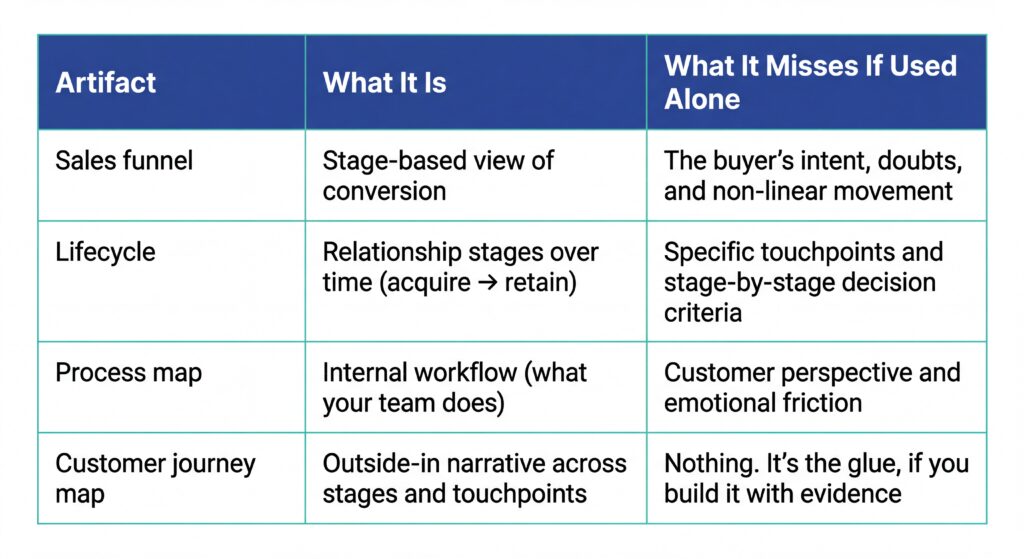
Customer journey diagram vs customer journey map
- A customer journey diagram is often a simplified visualization. Think: a clean slide showing stages, channels, and maybe a few pain points.
- A customer journey map is the working model underneath it. The messy, evidence-backed version you can operate from.
If your “map” cannot tell you what to fix next week, it is a diagram.
User journey mapping vs customer journey mapping
User journey mapping usually focuses on a person using a product to complete a specific task.
It is narrower. Often product-led.
Great for:
- onboarding flows
- feature adoption
- UX improvements
Customer journey mapping covers the full relationship, including sales-assisted steps, internal approvals, and post-sale reality.
In B2B, you often need both.
Customer Journey Mapping Models (Pick The Right One)
One reason journey maps turn into theatre is that teams pick the wrong model.
They choose a linear “Awareness → Consideration → Purchase” flow for a motion that looks more like:
- internal consensus building
- procurement stalling
- legal redlines
- re-evaluation after a competitor enters
Pick the model that matches how your buyers behave.
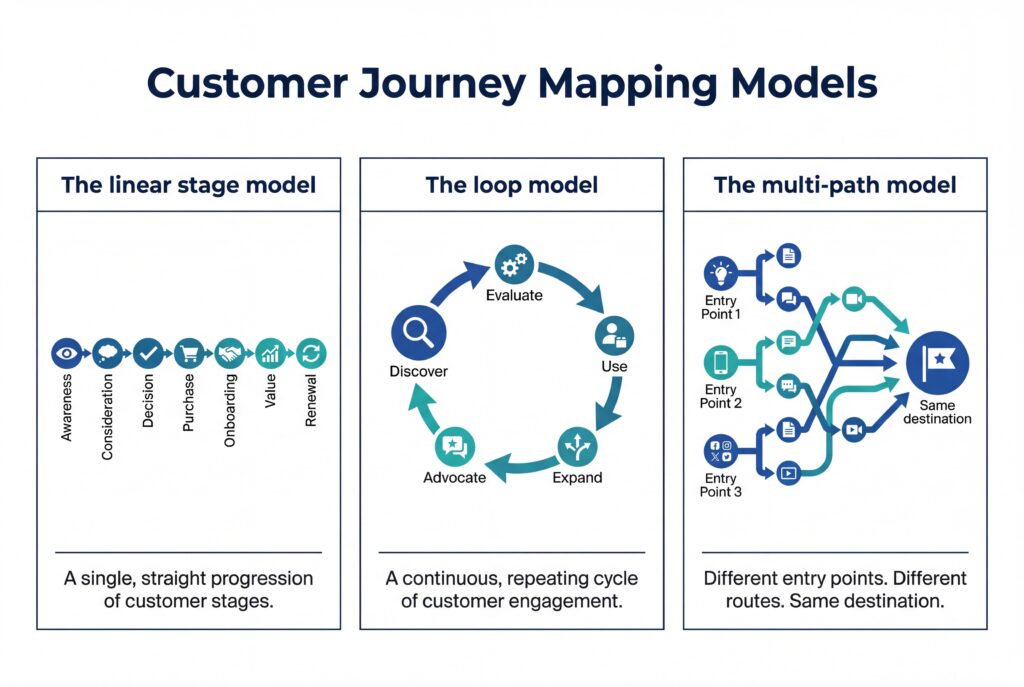
1) The linear stage model
This is the classic lifecycle flow.
Awareness → Consideration → Decision → Purchase → Onboarding → Value → Renewal
Use it when:
- your motion is relatively predictable
- your journey is mostly sequential
- you are mapping across teams (marketing, sales, CS)
It is simple. That is the point.
2) The loop model
This assumes customers do not “finish.” They cycle.
Discover → Evaluate → Use → Expand → Advocate → (back to Evaluate)
Use it when:
- product usage drives expansion
- customers re-evaluate frequently
- word of mouth and advocacy matter
It helps teams stop treating retention as an afterthought.
3) The multi-path model
This is the reality for many modern GTM motions.
Different entry points. Different routes. Same destination.
Use it when:
- some customers enter through content
- others enter through outbound
- some start with a free trial
- others start with a referral
A multi-path map prevents you from optimizing one “ideal” journey while ignoring everything else.
B2B nuance most Customer Journey maps ignore
A buyer is not one person.
Even in smaller deals, decisions are shaped by:
- a budget owner
- a technical evaluator
- an end user
- a blocker who hates change
Your journey model has to account for parallel movement. One stakeholder progressing while another is stuck.
That is why journey mapping is most powerful when it includes roles and influence, not just stages.
The building blocks of a customer journey map
If you want a map that survives first contact with reality, build it out of consistent components.
These are the essentials:
1) Segment & persona
Pick one segment to start. One.
A journey map with five personas and three motions is how you end up with a 40-box grid nobody reads.
Define the persona only to the level needed to explain behavior:
- role
- goals
- constraints
- what success looks like
Skip the fluff.
2) Customer goal
Write the goal as a single sentence that the customer would recognize.
Not your internal objective.
Example:
- “Reduce forecast risk without adding admin.”
- “Prove ROI fast enough to justify expanding headcount.”
That goal becomes the anchor for every stage.
3) Stages defined by intent
Stages are not your CRM stages.
Stages are changes in customer intent.
A good test: if a customer read your map, would they say, “yeah, that’s what I was trying to do then”?
4) Touchpoints & channels
List the real moments of interaction:
- content
- ads
- events
- outbound emails
- calls
- demos
- trials
- onboarding sessions
- support tickets
Include the gaps between them. Those gaps are where deals die.
5) Questions, decision criteria, perceived risk
At every stage, buyers are trying to reduce uncertainty.
A strong map captures:
- what they need to know
- what they need to believe
- what could make them say no
This is where most teams learn the most.
6) Friction & failure points
Friction is not “they had questions.”
Friction is when the customer cannot progress because something is missing:
- unclear value
- missing proof
- internal misalignment
- no owner
- bad handoff
7) Evidence & signals
A map built on opinions will get argued to death.
Attach evidence wherever you can:
- call transcripts
- win/loss notes
- CRM stage velocity
- pipeline drop-off
- website behavior
- product usage
- support themes
If you cannot point to evidence, label the insight as a hypothesis.
That is still useful. It just needs validation.
8) Ownership & SLAs
This is where journey maps become operational.
Every touchpoint needs:
- an owner
- a definition of “good”
- an SLA if a handoff is involved
No owner means no change.
Inputs you need before you start mapping
You do not need a perfect dataset.
But you do need enough truth to avoid building a fantasy journey.
Qualitative inputs
These are your “why.”
- customer interviews focused on decisions and friction
- sales call transcripts (especially discovery and late-stage)
- win/loss debriefs
- support tickets and CS notes
- onboarding feedback
If you are time-constrained, pick one: call transcripts.
They contain language, objections, and buying dynamics in their raw form.
Quantitative inputs
These are your “how often” and “how bad.”
- conversion rates between funnel stages
- stage velocity (how long deals sit)
- lead source to close rates
- churn and retention cohorts
- expansion timing
The alignment input Many teams skip
Get three leaders in a room:
- Marketing
- Sales
- Customer Success or RevOps
Ask them to independently write the stages of the journey in five minutes.
Then compare.
The differences are not a problem. They are the point.
That is your starting gap.
How to do customer journey mapping (step-by-step)
Step 1: Define scope & outcome
Start with a tight definition:
- Segment: who is this for?
- Motion: inbound, outbound, PLG, expansion?
- Time horizon: from first touch to first value? Renewal?
Then define the outcome in measurable terms.
Examples:
- Improve stage 2 to stage 3 conversion by 15%.
- Reduce time from demo to mutual plan by 10 days.
- Cut churn in month 3 by 20%.
If you cannot name what you are trying to improve, you will end up mapping everything.
And mapping everything is mapping nothing.
Step 2: Choose a model and define stages by intent
Pick one model (linear, loop, or multi-path).
Then define stages using intent shifts.
A useful structure:
- Trigger: what causes entry into the stage?
- Intent: what are they trying to achieve?
- Exit condition: what must be true to move forward?
This makes stages testable.
Step 3: Map touchpoints & handoffs
Now list what actually happens.
Include:
- marketing touchpoints (content, webinars, ads)
- sales touchpoints (outreach, discovery, demo, follow-up)
- CS touchpoints (onboarding, QBRs, support)
And the handoffs.
Handoffs are where momentum gets lost because responsibility gets vague. If your map does not make handoffs explicit, it will not improve execution.
Step 4: Capture customer questions & decision criteria
This is not “what content do we send.”
This is “what are they trying to resolve.”
For each stage, capture:
- their questions
- their decision criteria
- the risks they are trying to avoid
In B2B, you often need to capture this by stakeholder role (budget owners ask different questions than end users).
Step 5: Identify friction & root causes
Separate symptoms from causes.
A symptom: deals stall after demo.
Possible causes:
- no mutual plan
- unclear success criteria
- the champion cannot sell internally
- procurement enters with no prep
Good mapping makes root causes visible.
Step 6: Add signals & instrumentation
This is the “operator” step.
For every stage, ask:
- What signals tell us a customer is progressing?
- What signals tell us they are stuck?
- Where does that data live?
Examples:
- Stage progression correlated to specific behaviors (multi-threading, confirmed pain, next step with date)
- Content engagement tied to deal stage
- Trial activation events
- Support ticket themes in onboarding month 1
This is how you turn the map into something you can manage.
Step 7: Turn the map into a backlog
A backlog turns insight into change.
Use a simple prioritization method:
- Impact: how much revenue or retention does this affect?
- Frequency: how often does it happen?
- Effort: how hard is it to fix?
Then assign:
- owner
- due date
- metric
This is the difference between “we should improve onboarding” and “we will reduce time-to-first-value by 7 days by fixing step X.”
Customer journey map template
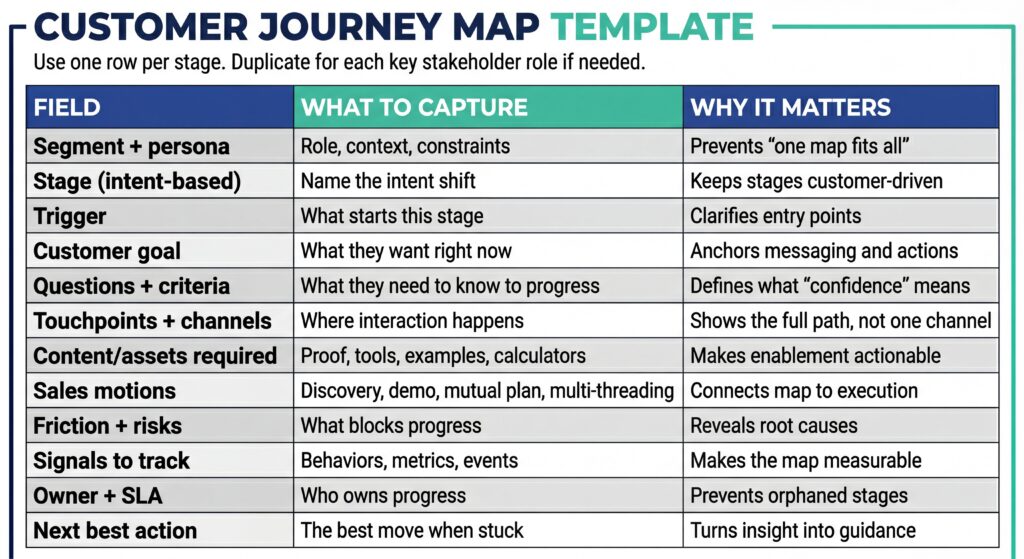
How to use the template without turning it into a slog:
Two approaches work:
Workshop (fast & aligned)
- 60 to 90 minutes
- cross-functional leaders plus one frontline rep
- one segment, one journey
Rules:
- Evidence beats opinion.
- If you disagree, write both hypotheses and assign validation.
- Leave with a backlog, not a slide.
Async (slower but more detailed)
- One owner drafts the first version
- Stakeholders review with edits and evidence
- Run a short alignment session only for disagreements
Most teams do better with a workshop first, then async refinement.
Customer journey map examples (Marketing + Sales)
Examples matter because they reveal how different a map looks depending on the motion.
Example 1: B2B SaaS, sales-assisted, committee buying
Stage: Evaluate internal fit
- Customer goal: build internal confidence that this will work in their environment
- Key questions: integration effort, security posture, time to value
- Touchpoints: technical call, security review, reference customer
- Friction: champion cannot answer technical objections
- Signals: technical stakeholder engaged, integration plan documented, security packet shared
- Next best action: provide a “day 1” implementation outline and a reference call with a similar stack
What changes when this is mapped:
- Marketing stops pushing generic “benefits” content.
- Sales stops improvising answers late.
- Enablement builds proof assets for technical evaluators.
Example 2: Product-led motion, trial to upgrade
Stage: First value
- Customer goal: experience a meaningful outcome quickly
- Key questions: “Did this actually save me time?”
- Touchpoints: onboarding emails, in-app guidance, usage nudges
- Friction: setup takes too long, unclear first win
- Signals: activation event completed, key feature used twice, teammate invited
- Next best action: guided path to a single outcome, not a product tour
What changes:
- Activation becomes a measurable play, not a hope.
- Product and Marketing align on the one “first win” to drive.
Example 3: Expansion journey, post-sale growth
Stage: Prove ROI to renew
- Customer goal: justify spend with results
- Key questions: adoption, outcome metrics, executive narrative
- Touchpoints: QBR, dashboards, success plan
- Friction: value not quantified, stakeholder churn
- Signals: success metrics tracked, exec sponsor engaged, renewal timeline confirmed
- Next best action: build a renewal brief and re-engage the budget owner early
What changes:
- CS stops reacting in month 11.
- Expansion becomes proactive.
Customer Journey Mapping Software (& How To Choose It)
You do not need fancy tooling to start.
You need tooling when:
- the journey spans many teams
- you want evidence attached to stages
- you need version control and governance
- you want to connect map stages to live data
What to look for in customer journey mapping software
Prioritize operational capabilities over visuals.
- Collaboration and version control
- Integration with CRM, analytics, support, product data
- Ability to attach evidence (calls, dashboards, assets)
- Permissions and governance
- Ease of updating, not just presenting
How EnableU Helps
Most customer journey mapping software helps you document a journey.
EnableU helps you define the right one.
Before teams map stages or touchpoints, EnableU guides leaders to clarify the fundamentals that make a journey usable:
- who the ICP really is
- how buyers move
- where decisions stall
- and how marketing and sales motions should align.
That strategic clarity is what turns a journey map from a diagram into something teams can execute against.
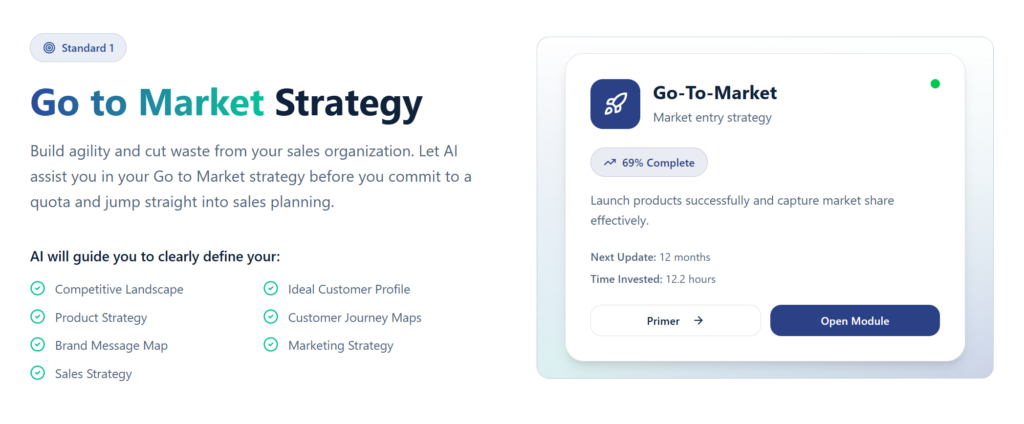
👉 Want to see this in action? Start a free trial.
Measurement: Proving ROI From Customer Journey Mapping
If you cannot show impact, journey mapping becomes a side project.
Use metrics that align to stages.
A practical scorecard
- Acquisition: cost per qualified lead, lead-to-opportunity conversion
- Conversion: stage-to-stage conversion rates
- Velocity: time in stage, cycle length
- Quality: deal slippage, late-stage loss reasons
- Retention: time-to-first-value, churn by cohort
- Expansion: adoption depth, expansion timing
The key move – tie improvements to the specific stage you targeted. Do not claim “overall pipeline improved” if you only fixed one handoff.
Teams trust you more when you are precise.
Common mistakes that make journey maps useless
Mistake 1: Mapping your internal process, not customer intent
If your stages look like your CRM stages, you probably built an inside-out map.
The fix: Rename stages by intent and write entry and exit conditions.
Mistake 2: Building a map entirely from opinions
Maps built in a workshop without evidence tend to get debated forever.
The fix: Attach data and transcripts. Label hypotheses. Validate quickly.
Mistake 3: Trying to map every persona at once
This is how teams build a map that is technically complete and practically useless.
The fix: One segment, one journey, one outcome.
Mistake 4: No ownership
If no one owns a stage, it will not improve.
The fix: Assign owners and SLAs like you would for pipeline stages.
Mistake 5: No backlog
A map without a backlog is just documentation.
The fix: Prioritize and commit to changes.
Frequently Asked Questions
What is customer journey mapping software used for?
Customer journey mapping software helps teams centralize journey data, collaborate across functions, and connect journey stages to real signals like CRM activity, product usage, and support interactions. It’s most useful when journey ownership spans Marketing, Sales, and Customer Success.
How detailed should a customer journey map be?
Detailed enough to drive action, not so detailed it becomes unreadable. A strong customer journey map captures intent, key decisions, friction, and signals at each stage, while leaving tactical execution to playbooks and workflows tied to the map.
How often should you update a customer journey map?
At minimum, review it quarterly. Update immediately after major GTM changes like pricing shifts, new segments, product launches, or changes in buying committees. A static journey map quickly becomes misleading.
Is customer journey mapping only for marketing teams?
No. While marketing often initiates it, customer journey mapping is most effective when owned jointly by Marketing, Sales, and RevOps. The biggest gains come when the map shapes sales motions, coaching, and handoffs, not just campaigns.
Conclusion
Customer journey mapping works when it’s treated as a system.
A strong customer journey map starts with a clear segment, anchors every stage to buyer intent, and makes friction, evidence, and ownership impossible to ignore.
When done right, it stops guesswork. Marketing knows what proof to provide. Sales knows what progress looks like. Leaders know where revenue actually gets stuck.
The process matters as much as the artifact – define the journey carefully, map it with evidence, and use it to drive decisions.
If you want to build customer journey mapping directly into your go-to-market strategy, start a free trial of EnableU’s Sales Excellence Framework and see how journey maps live alongside ICPs, GTM strategy, and real signals from the field.
Leave a Reply